

Connect Okta
Keel reads your Okta org once a day and checks:
- Authenticator enrollment policies require a second factor
- Super Administrator footprint
- Password policy minimum length
An Okta API token acts with the permissions of the admin who created it. So the token is only as read-only as that admin: create it while signed in as an admin who holds only the Read-Only Administrator role.
Time: about 10 minutes, most of it creating the read-only admin.
Before you start
Section titled “Before you start”- In Okta: you are a Super Administrator, so you can assign admin roles.
- In Keel: you are an owner or admin of the workspace.
Create a read-only admin
Section titled “Create a read-only admin”Use a dedicated service user, so the token keeps working when people leave. Okta revokes a token if the user who created it is deactivated.
- In the Okta Admin Console, go to Directory > People > Add person.
- Create a user such as
keel-readonly@yourcompany.comand activate it. - Go to Security > Administrators > Add administrator.
- Select the new user, assign Read-Only Administrator, and click Save Changes. Assign no other role.
- Sign out, then sign in to the Admin Console as the new user.
Create the API token
Section titled “Create the API token”While signed in as the read-only admin:
- Go to Security > API.
- Click the Tokens tab, then Create token.
- What do you want your token to be named?
Keel evidence (read-only). - API calls made with this token must originate from: Any IP. Keel collects from Cloudflare’s network, so its address is not fixed.
- Click Create token.
- Click the copy icon next to the token value. Okta shows it only once.
Okta revokes a token that goes unused for 30 days. Keel uses it every day, so it stays active while the connection is in place.
Connect it in Keel
Section titled “Connect it in Keel”- In Keel, open Integrations, find the Okta card and click Connect.
- Under Credentials, fill in:
- Okta org domain: for example
acme.okta.com. It must end in.okta.com,.oktapreview.comor.okta-emea.com. Do not use the-adminaddress or a custom domain. - API token: the token you copied.
- Okta org domain: for example
- Click Save connection.
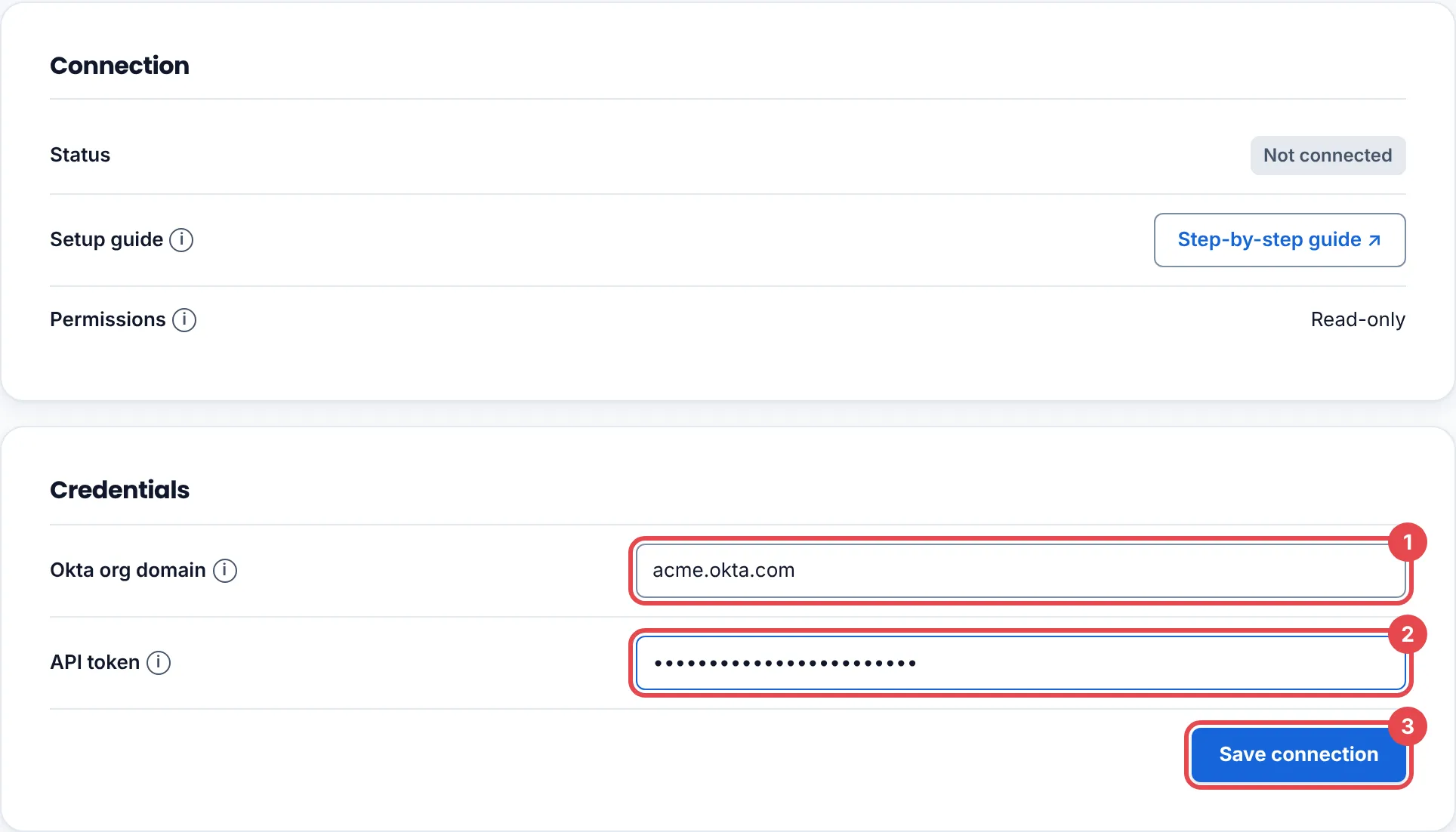
Evidence connector connected. Its credential is stored encrypted. means it worked.
See the first findings
Section titled “See the first findings”Open the Findings tab and click Collect now, or wait for the next daily run.
Troubleshooting
Section titled “Troubleshooting”| What you see | What to do |
|---|---|
| Check the connection details and try again. | The domain has -admin in it, is a custom domain, or the token was not copied whole. Use yourorg.okta.com and paste the token again. |
| A check reads N/A after it worked before | The token was revoked: its admin was deactivated, or it went 30 days unused. Create a new token and reconnect. |
| That source is already connected to another Keel workspace, so it was not connected here. | One Okta org can be connected to one Keel workspace. Disconnect it there first. |
Rotate or remove access
Section titled “Rotate or remove access”- Rotate: create a new token as the read-only admin, disconnect and reconnect in Keel, then revoke the old token on Security > API > Tokens.
- Remove: click Disconnect in Keel, then revoke the token in Okta.